CO2 vs Fiber Laser: Which One Should You Buy?
A buying guide for engraving and marking businesses, not sheet metal fabricators. What each laser actually does, where people get the decision wrong, and when you need both.
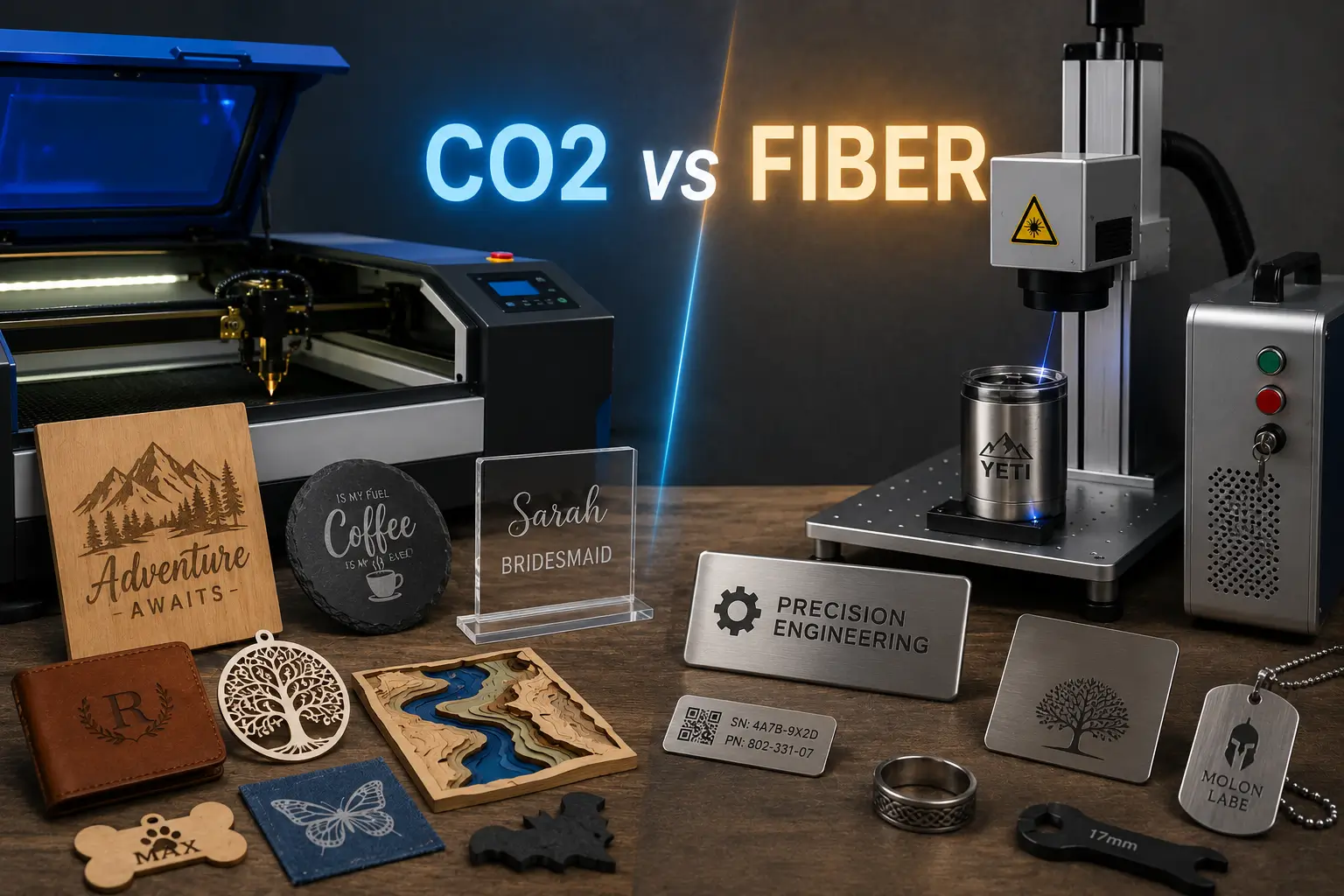
The decision comes down to one thing: what you make. CO2 lasers emit at 10.6 microns, which organic and non-metallic materials absorb efficiently, making them the right choice for wood, acrylic, leather, fabric, paper, glass, stone and foam. They also cut, which fiber machines in this class generally do not. Fiber lasers emit at around 1,064 nm, which metals absorb well, making them the right choice for marking stainless steel, aluminium, brass and titanium. A CO2 laser cannot mark bare metal without a marking compound, and a fiber laser is poor on most organics. If your product line spans both, you need two machines or a dual-source system.
Key takeaways
- Wavelength decides everything. CO2 at 10.6 microns is absorbed by organics. Fiber at 1,064 nm is absorbed by metals. Every other difference follows from that one fact.
- CO2 cuts. Fiber marks. In the desktop and small-business class, CO2 machines cut through material while fiber markers mark the surface. If you need parts cut to shape from sheet goods, that is a CO2 job.
- Newer does not mean better for your work. Fiber is the more recent technology and dominates industrial metal cutting, but that has almost no bearing on whether it suits a personalisation or signage business.
- Marking compounds are a bridge, not a solution. A CO2 laser can mark metal with CerMark or similar, which is fine occasionally and uneconomic in production.
- Most published comparisons answer a different question. They compare industrial sheet metal cutters at $40,000 and up. That is a different decision from choosing a machine for an engraving business.
Search this question and you will find a great deal of information about cutting 20mm mild steel, oxygen assist, and continuous wave industrial systems priced from forty thousand dollars upward. All of it is accurate. Almost none of it helps if you are deciding what machine to put in a workshop, a garage, or a storefront.
The industrial answer and the engraving business answer are genuinely different, because the work is different. A fabricator is asking which laser cuts thick metal faster. A maker or small business is asking which machine lets them produce and sell the widest range of products. This guide answers the second question.
The One Difference That Explains Everything
Both are infrared lasers, but they operate at wavelengths roughly ten times apart, and materials do not absorb both equally.
CO2 Laser | Fiber Laser | |
|---|---|---|
Wavelength | 10.6 microns (10,600 nm) | Around 1,064 nm |
How light is generated | Electrically excited gas mixture in a sealed tube | Diode pumped, amplified through fibre doped with a rare earth element |
Beam delivery | Mirrors and a focusing lens | Fibre optic cable to the head, or a galvo scanner |
Absorbed well by | Wood, acrylic, leather, fabric, paper, glass, stone, foam, rubber | Steel, stainless, aluminium, brass, titanium, some engineered plastics |
Reflected by | Bare metal | Nothing relevant, but poorly absorbed by most organics |
Primary function in this class | Cutting and engraving | Marking and engraving |
That absorption difference is not a minor preference. Point a CO2 laser at bare stainless steel and most of the energy reflects away, so nothing happens. Point a fiber laser at a sheet of plywood and it will scorch inefficiently rather than cut cleanly. Neither machine is underpowered in those situations; the material simply is not taking the energy.
Everything else you will read about these two technologies follows from this. The cost differences, the maintenance differences, the speed differences, all of it sits downstream of which materials each one can actually process.
What Each One Actually Does Well
This table is the decision, more than any spec sheet.
Material | CO2 | Fiber | Notes |
|---|---|---|---|
Wood and plywood | Cuts and engraves | No | The single largest category for most engraving businesses |
Acrylic | Cuts with flame-polished edge | No | CO2 produces the clear polished edge acrylic is bought for |
Leather | Cuts and engraves | No | CO2 only |
Fabric and felt | Cuts, seals edges | No | CO2 only |
Paper and card | Cuts and engraves | No | CO2 only |
Foam (EVA, PE, PU) | Cuts and engraves | No | CO2 only |
Stone and slate | Engraves | Specialist only | CO2 is the practical choice |
Glass | Frosts and engraves | No | CO2 only |
Rubber stamps | Cuts and engraves | No | CO2 only |
Coated or powder-coated metal | Removes coating | Removes coating | Both work; this is why CO2 handles coated tumblers |
Bare stainless steel | Only with marking compound | Marks and engraves | Fiber is the correct tool |
Bare aluminium | Only with marking compound | Marks and engraves | Fiber, especially anodised |
Brass and copper | No | Marks well | Fiber; reflective metals suit it particularly |
Jewellery metals | No | Marks and engraves | Fiber |
Serial numbers, data matrix on metal | No | Excellent | Fiber; this is what it is built for |
Read down the CO2 column and then the fiber column, and the shape of the decision becomes obvious. CO2 covers a wide spread of materials that most engraving businesses actually sell. Fiber covers metal, deeply and well, and very little else.
The Question That Actually Decides It
Forget specifications for a moment and answer this instead: what are you going to make and sell?
If your work is mostly... | Buy | Why |
|---|---|---|
Signage, wood, acrylic, gifts, personalisation | CO2 | Covers the widest range of sellable products |
Coated tumblers and drinkware | CO2 | You are removing coating, not marking metal |
Bare metal marking, jewellery, tooling | Fiber | CO2 cannot do this without consumables |
Serial numbers, traceability, part marking | Fiber | Built for exactly this |
Leather goods, apparel, textiles | CO2 | Fiber cannot process these at all |
Cutting parts from sheet material | CO2 | Fiber in this class marks rather than cuts |
Awards and trophies | CO2 primarily | Acrylic, wood and glass are the usual substrates |
A mix of wood, acrylic and bare metal | Both, or a dual-source machine | No single-source machine covers both well |
If you are starting a general laser engraving business and can only buy one machine, CO2 is almost always the correct first purchase. It covers more sellable product categories, it cuts as well as engraves, and coated drinkware, which is a large share of the personalisation market, runs on it perfectly well.
Fiber becomes the right first purchase when your work is specifically metal: industrial part marking, tooling identification, jewellery, firearms, or traceability codes. In that case CO2 is not a compromise, it simply will not do the job.
Where People Get This Decision Wrong
Assuming newer means better. Fiber is the more recent technology and it has genuinely displaced CO2 across industrial metal cutting. That is a real trend and it is irrelevant to a workshop cutting plywood and acrylic. Technology maturity is not the same as fitness for your work.
Believing a marking compound removes the need for fiber. CerMark, Thermark and similar products do let a CO2 laser mark bare metal, and for occasional jobs that is a sensible bridge. In production it is slow, adds a consumable cost per part, and requires application and cleanup on every piece. If metal marking is a regular revenue line, buy the fiber.
Shopping on wattage. Wattage only compares meaningfully within the same laser type. A 50W fiber and a 50W CO2 are not interchangeable and are not measuring the same thing in practice. Decide the technology first, then the power.
Expecting a desktop fiber to cut sheet metal. Industrial fiber cutters run at kilowatt power levels with assist gas. A compact fiber marker in the 20 to 100W range marks metal and may cut very thin sheet, but it is not a metal cutting machine. Those are different products at very different prices.
Comparing against industrial buying guides. Most published comparisons on this topic are written by and for sheet metal fabricators. Their conclusions about operating cost, throughput and thickness capability are correct for that context and can point you at entirely the wrong machine for yours.
Running Costs and Maintenance
These differences are real, though they matter less at desktop scale than the industrial literature suggests.
Electrical efficiency. Fiber lasers convert electricity to light considerably more efficiently. At industrial power levels the gap is dramatic, with a high-power CO2 system and chiller drawing several times what a comparable fiber system uses. At workshop power levels the absolute difference is much smaller, though it still favours fiber.
Consumables and service life. A CO2 tube is a consumable with a finite life and will eventually need replacing. Fiber sources are effectively maintenance-free with very long rated lifetimes. This is one of fiber's genuine structural advantages.
Beam alignment. CO2 machines deliver the beam through mirrors, which can drift out of alignment and need periodic checking. Fiber delivers through a fibre optic cable or galvo head, removing that maintenance task entirely.
Tube type matters within CO2. Glass tubes are cheaper up front with a shorter service life. RF metal tubes cost more and last considerably longer, with better beam quality and faster pulsing. If you are running production hours on a CO2 machine, the tube type affects your real cost of ownership more than most buyers expect.
None of this changes the material compatibility question. Lower running costs on a machine that cannot process your materials is not a saving.
Cutting, Marking and Engraving Are Different Questions
These terms get used loosely and it causes real confusion when buying.
Cutting means through the material, producing a part. In the desktop and small-business class this is CO2 territory. Fiber cutting of metal exists but at industrial power levels and industrial prices.
Engraving means removing material to a visible depth. Both technologies do this on their respective materials.
Marking means changing the surface appearance without meaningful material removal, such as annealing stainless steel to a flat black mark. This is fiber's specialty and where it clearly outperforms.
The distinction matters most on metal. If you want a flat, corrosion-safe mark on stainless, that is annealing, and it needs fiber. Our guide to laser engraving stainless steel covers the three metal marking processes and when each applies.
What About UV and MOPA?
Two other terms come up in this comparison and are worth placing.
MOPA is a type of fiber laser, not an alternative to it. A standard fiber source has a fixed pulse width; a MOPA source lets you vary it. That control enables colour marking on stainless and reduces heat input on thin or delicate parts. If colour marking on metal is part of your plan, you want MOPA specifically rather than fiber generally.
UV is a third category for heat-sensitive work. UV lasers operate at a much shorter wavelength and deposit very little heat, which suits delicate electronics, medical components and some plastics that would deform under fiber or CO2. It is a specialist purchase rather than a general-purpose one, and it does not replace either of the other two.
Can One Machine Do Both?
Increasingly, yes, and this is worth knowing before you commit to one technology.
Dual-source machines pair a CO2 source with a fiber or MOPA source in a single system, letting you cut and engrave organics with one and mark metal with the other. That removes the compromise entirely for businesses whose product line genuinely spans both.
The trade-off is cost and footprint against buying one machine now and a second later. Two considerations usually decide it. If your metal work is occasional, a CO2 machine plus marking compound will carry you until volume justifies a dedicated fiber. If metal marking is a real revenue line from day one, a dual-source system or two machines is the honest answer, and trying to make one source cover both will cost you more in wasted time than the second machine costs.
Across the Thunder Laser range, the CO2 systems cover cutting and engraving on organics, the fiber markers handle metal, and dual-source options exist for shops that need both in one footprint.
Recommendations by Business Type
Business | First Machine | Add Later |
|---|---|---|
General personalisation and gifts | CO2 | Fiber if metal jewellery or bare tumblers grow |
Signage and display | CO2 | Rarely needed |
Awards and trophies | CO2 | Fiber for metal plates and inserts |
Drinkware and tumblers | CO2 | Fiber only if moving to bare stainless |
Jewellery | Fiber | CO2 for packaging and display pieces |
Industrial part marking | Fiber | Rarely needed |
Firearms and tooling | Fiber | CO2 for cases and accessories |
Makerspace or school | CO2 | Broadest material range for teaching |
Leather goods and apparel | CO2 | Not applicable |
Mixed product line | Dual-source or both | Depends which side grows |
Making the Decision
Strip away the specifications and this is a materials question wearing a technology costume. Write down what you plan to make in your first year, check it against the materials table above, and the machine will select itself.
If the list is mostly wood, acrylic, leather, fabric and coated drinkware, buy CO2 and do not agonise over it. If it is bare metal parts, jewellery or traceability marking, buy fiber. If it genuinely spans both, price a dual-source machine against two separate ones before assuming you can make one cover everything. And if you are still weighing materials, our guides to laser cut foam and laser engraving stone cover two of the categories that only CO2 can handle.
Frequently asked questions
Can a CO2 laser cut metal?
Not in the desktop and small-business class. High-power industrial CO2 systems cut metal with assist gas, but a workshop CO2 engraver cannot. It can mark bare metal using a marking compound, and it removes coatings from powder-coated metal products very effectively.
Can a fiber laser cut wood or acrylic?
Not well. Most organic materials absorb 1,064 nm poorly, so a fiber laser tends to scorch or char rather than cut cleanly. Acrylic in particular will not produce the flame-polished edge a CO2 laser gives. For organics, CO2 is the correct tool.
Which is better, CO2 or fiber?
Neither. They process different materials. The question that matters is what you intend to make. For wood, acrylic, leather, fabric and general engraving work, CO2. For bare metal marking, fiber. Anyone answering this without asking what you produce is not really answering it.
Is fiber replacing CO2?
In industrial metal cutting, largely yes. In engraving and personalisation, no, because fiber cannot process the organic materials those businesses are built on. The two are serving different markets rather than competing for the same one.
Do I need more watts for a fiber or a CO2 laser?
Wattage is not comparable across the two technologies. A 50W fiber and a 50W CO2 are doing different jobs with different beam characteristics. Choose the technology based on your materials, then choose power based on the speed and depth you need within that technology.
Can I mark metal with a CO2 laser?
Yes, using a marking compound such as CerMark applied to the surface before marking. It works and produces a durable mark. It also adds a consumable cost, application time and cleanup to every part, which makes it suitable for occasional jobs rather than production runs.
What is the difference between a fiber laser and a MOPA laser?
MOPA is a fiber laser with adjustable pulse width. That extra control enables colour marking on stainless steel and reduces heat input on thin parts. All MOPA lasers are fiber lasers; not all fiber lasers are MOPA.
Should my first machine be CO2 or fiber?
For most people starting an engraving or personalisation business, CO2. It covers a far wider range of sellable products and it cuts as well as engraves. Start with fiber only if your business is specifically metal marking from the outset.