
Laser engraving has become one of the fastest-growing methods for personalization, small business production, and creative design. From hobbyists making custom gifts to companies producing high-volume products, the success of every project depends not only on the machine but also on the software that powers it. Choosing the best laser engraving software can improve precision, speed, and workflow efficiency.
This guide explains the most popular options, compares their features, and helps you decide which one is right for your needs.
Why does software matter in laser engraving?
A laser engraver is only as good as the instructions it receives. Software plays a central role in:
- Design creation: Turning ideas into vector or raster files
- Machine control: Managing speed, power, and movement
- File compatibility: Accepting different file types such as SVG, DXF, or AI
- Workflow efficiency: Automating settings, job queues, and repeats
- Customization: Supporting text engraving, logos, barcodes, and patterns
Without the right software, even the most advanced engraver can produce poor results.
What are the main types of laser engraving software?
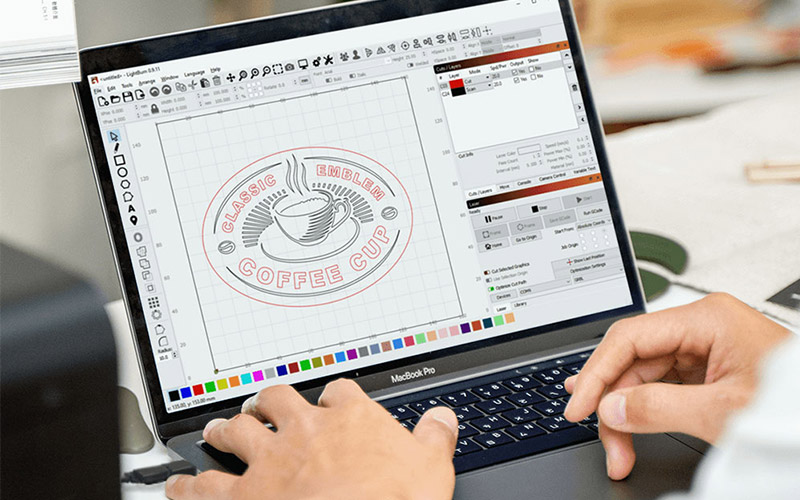
Laser engraving software falls into three categories:
- Design software such as Adobe Illustrator and CorelDRAW, which allow you to create and edit designs.
- Dedicated laser control software such as LightBurn and RDWorks, which send commands directly to the engraver.
- CAD and industrial software such as AutoCAD and SolidWorks, which are used for engineering and technical projects.
Most users rely on a combination of design and control software for the best results.
What are the top laser engraving software options in 2025?
Here is a comparison of the most commonly used software:
| Software | Best For | Key Features | Price Range | Ease of Use |
|---|---|---|---|---|
| LightBurn | Hobbyists and professionals | Cross-platform, supports many machines, design and control in one | $60–$120 one-time license | Very easy |
| RDWorks | CO2 engravers with Ruida controllers | Free with many machines, basic design and control | Free | Moderate |
| EZCAD | Fiber laser machines | Advanced marking, barcodes, industrial use | Free with machine | Moderate to difficult |
| CorelDRAW | Graphic designers | Powerful vector design, widely compatible | $249 per year | Easy for designers |
| Adobe Illustrator | Professional design studios | Industry standard design tools, works with plug-ins | $20.99 per month | Easy for advanced users |
| AutoCAD | Engineering and technical engraving | 2D and 3D design, precision technical drawings | $245 per month | Complex |
| LaserGRBL | Entry-level users with GRBL controllers | Lightweight, simple engraving control | Free | Easy |
| Inkscape (with plug-ins) | Free design option | Open-source, vector graphics | Free | Easy to moderate |
Top Laser Engraving Software Options for Thunder Laser USA Machines
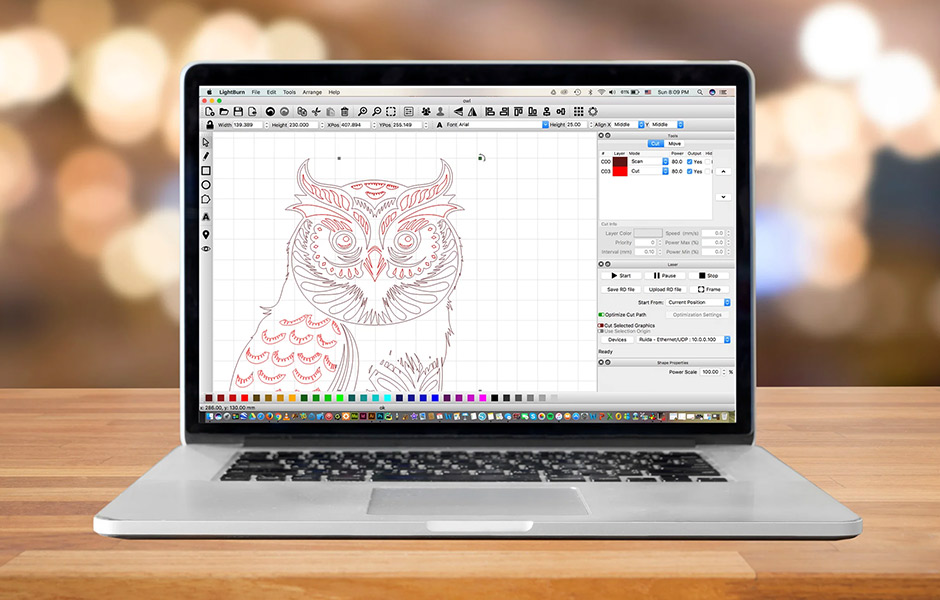
If you are using a Thunder Laser USA machine, these software choices give you the best balance of performance and ease of use:
- RDWorks is a powerful free software designed specifically for Thunder Laser USA machines, offering strong compatibility and a wide range of features.
- LightBurn is a popular user-friendly software that supports multiple laser systems, including Thunder Laser USA machines, and combines design with machine control.
- CorelDRAW is a versatile graphic design software that works well alongside RDWorks or LightBurn, giving users advanced design capabilities for complex projects.
These options ensure Thunder Laser USA users can choose software that matches their workflow, whether they want free tools, all-in-one control, or professional-grade design flexibility.
Why is LightBurn considered the best overall?
LightBurn is often called the gold standard for laser engraving software because it combines design and control features in one platform. Benefits include:
- Works on Windows, Mac, and Linux
- Supports hundreds of laser machine brands
- Offers direct editing of text, shapes, and vectors
- Allows power and speed settings inside the program
- One-time purchase instead of ongoing subscription
For users who want a step-by-step setup tutorial, we created a detailed guide on how to use LightBurn software for CO2 and fiber laser machines.
For most small businesses and serious hobbyists, LightBurn balances affordability with advanced features.
Which software is best for beginners?
Beginners often need simple interfaces and low costs. Good options include:
- LaserGRBL is free and lightweight, ideal for diode laser engravers.
- RDWorks comes free with many Ruida-based CO2 lasers.
- Inkscape with plug-ins is open-source and perfect for those who want to learn vector design without paying for Adobe or Corel.
These programs provide enough tools to start engraving without overwhelming new users.
What about professional and industrial users?
Businesses and industrial users often choose:
- EZCAD for fiber lasers marking metals, serial numbers, and barcodes
- CorelDRAW or Illustrator for graphic design workflows
- AutoCAD or SolidWorks for engineering projects requiring extreme precision
Professional users often combine design programs like CorelDRAW with machine software such as LightBurn for full control.
What are the pros and cons of free vs paid software?
| Type | Pros | Cons |
|---|---|---|
| Free software | No cost, easy to test, good for learning | Limited features, less support, compatibility issues |
| Paid software | More features, regular updates, better support | Higher upfront or subscription costs |
For businesses, paid software often pays for itself by saving time and reducing errors. For casual users, free tools may be enough.
How to choose the best laser engraving software?
When selecting software, consider:
- Machine compatibility since not all programs work with every controller.
- Type of work whether your focus is art and graphics or industrial marking.
- Budget since free tools may work for hobbyists, while businesses benefit from paid solutions.
- Ease of use since simple interfaces help beginners, while advanced users may need more customization.
- Community support since software with large user groups and tutorials can speed up learning.
FAQs on Best Laser Engraving Software
What is the easiest laser engraving software to use?
LightBurn is widely considered the easiest, with an intuitive interface and strong support community.
Can I use Photoshop for laser engraving?
Yes, but Photoshop is raster-based. For engraving, vector files from Illustrator or CorelDRAW work better.
Do I need separate software for design and engraving?
Not always. LightBurn combines both, but some users prefer Illustrator for design and LightBurn for machine control.
Is free software enough for serious engraving?
Free tools like LaserGRBL and Inkscape are good for learning, but most businesses upgrade to paid software for advanced features.
Which software works best for fiber lasers?
EZCAD is the standard for fiber laser machines, especially for metal engraving and barcode marking.
Does laser engraving software work on Mac?
Yes. LightBurn is the most popular Mac-compatible option, while RDWorks and EZCAD are Windows-only.
What file types do laser engravers use?
Most accept vector files like SVG, DXF, and AI, along with raster files such as BMP or PNG.
Final Thoughts
The best laser engraving software depends on your needs, machine type, and budget. LightBurn is a top choice for most hobbyists and small businesses, while EZCAD and AutoCAD serve industrial users. Free tools are a good starting point, but paid solutions often deliver better results and long-term efficiency.
By choosing the right software, you can unlock the full potential of your laser engraver and produce work that is precise, professional, and consistent. For Thunder Laser USA users, software like RDWorks, LightBurn, and CorelDRAW offer everything needed for smooth operation and creative flexibility.