
X and Y Sensor Flag Deformation Can Cause Erratic Motion Control & Crashes
here is how to test: X and Y Endstop Tests
Reasons:
1. The machine fails to reset successfully after you turn on he machine(press "ESC" button during the reset process), the coordinate of X/Y will be mess.
Solution:
Please make sure the machine can complete the automatic reset every time after the customer turn on the machine.
2. For 5-pin rotary machine, the rotary is controlled by Y-axis. If the user does not press the "Reset" button after using rotary device, the coordinate of the Y axis will be mess.
Solution:
For 5-pin rotary machine user, please remember to press"Reset" button on the panel after he/she using the rotary device.
How to avoid this issue?
Please set the "Emergency acceleration" of X/Y axis in Vendor settings of RDWorks and Lightburn.
RDWorks
Please go into “ File>> Vendor settings(password is rd8888)>>Motor>>press “Read”, then change the Estop-acc of X and Y at 150000, the max speed of Y-axis at 300mm/s>>press “Write”>> press "Read" again to see if the setting is successful.


Lightburn
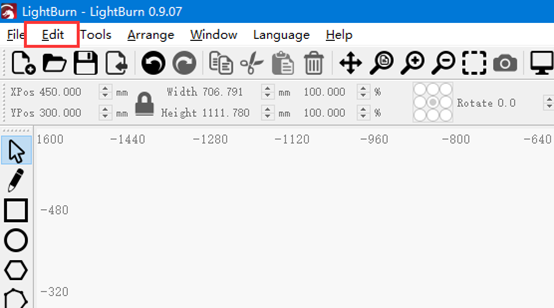
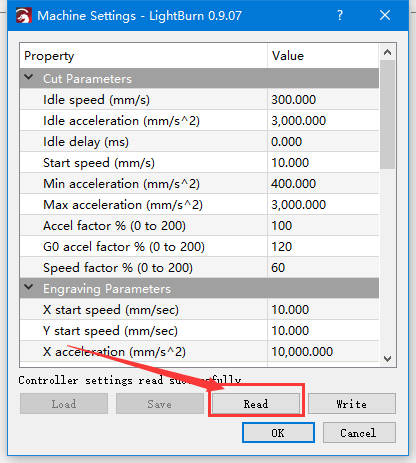
Please go into “Edit>> Machine settings>> then press read>> X –axis settings, change the E-stop acceleration to 150000>>Y-axis settings, change the Max speed to 300mm/s, the E-stop acceleration to 150000>>Press “Write”, after these, please press “Read” and check if the settings are changed.


End.
Still stuck?
Fastest response times in the industry from our US-based support team.