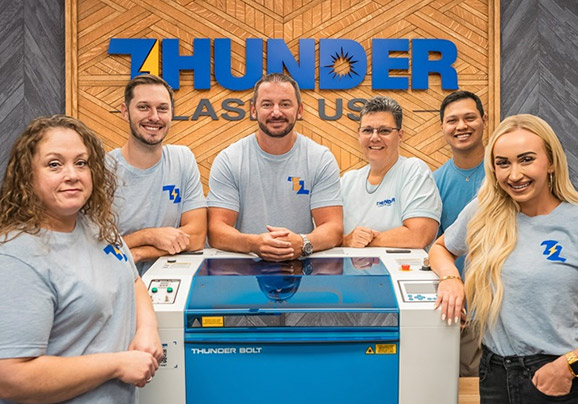
A laser your members can run, in a building that was never set up for one.
Cut and engrave wood, acrylic, matboard, leather, cork, and foam on a fully enclosed machine that stays safe and simple for a mixed-skill membership. It runs on a standard 110v wall outlet and recirculates its own clean air with no outside duct, so it goes in the shop you already have instead of the one you would have to build.
Most makerspaces run the wide-bed Nova Plus 51 or 63, starting at $13,450.
US support from coast to coast and over 1,000 five-star reviews on Trustpilot.
The reason your space still does not have a laser is almost never the laser.
For most makerspaces the machine was never the hard part. The wall was. A laser meant a roof penetration, a duct run, and a facilities and safety sign-off that stalled the whole idea, so members kept buying their project materials as kits, waiting days for a cut file to come back from an outside shop, or fighting over the one tool that only does one material. Meanwhile the wish list grows: signage for the space, enclosures for a robotics build, a member’s side business in acrylic, an art piece in plywood. Every one of them is a separate order, a separate wait, or a separate machine. A fully enclosed 110v laser that recirculates its own air with no outside duct closes that gap in a single afternoon install.
One enclosed bench that any member can run, with no facilities project to install it.
Put a laser on your own floor and the whole program changes. Members stop waiting on outside cut files and stop buying overpriced kits, one machine replaces the shelf of single-material tools, and the wide bed means a real project fits instead of getting scaled down to what the equipment allows. It also opens up what your space can offer: classes, personalized goods, prototyping nights, a member’s side hustle. The capability finally lives in the room, and it installs without an electrician or a duct crew.
It installs where you already are
Standard 110v wall outlet, no 220v service and no electrician. The Thunder Air 700 pulls fume through its own filters and recirculates clean air, so there is no roof penetration and no outside duct. This is the piece that clears facilities and safety and finally gets a laser approved for your building.
Safe and simple for mixed skill
The whole cutting area is enclosed, so the beam stays inside the machine and a first-time member is not standing over an open frame. LightBurn software is included and the workflow is one file to one machine, so a teenager, a retiree, and a pro engineer all run it the same afternoon.
One tool for most of your materials
Wood, acrylic, matboard, leather, cork, and foam, cut clean and engraved fine, all on the same bed. The wide-bed 51 and 63 take full sheets, so a member’s real project fits instead of getting cut down to size, and a busy space keeps the queue moving.
Most of what your members carry in the door, one machine handles.
Wood and acrylic are what a makerspace runs most, plywood and hardwood for prototypes and signage, cast and extruded acrylic for displays, enclosures, and clean edges. From there the same bed takes matboard, leather, cork, felt, paper, and foam. Cut and engrave, all on one machine.
Not sure how your plywood, your acrylic, or a material a member wants to try will cut or engrave? That is what the free sample is for. Send a few pieces of the real material your program uses and we will run them and tell you straight whether it is a good fit.
A short list we will not run, and it is a safety line, not a preference.
PVC and vinyl release hydrogen chloride, which is corrosive and unsafe to breathe, and ABS releases hydrogen cyanide, so neither ever goes in the machine. Polycarbonate browns instead of cutting clean. Many craft foams, faux leathers, and colored plastics are secretly PVC, so if a member cannot name what a material actually is, the answer is no until they can. We would rather tell you the truth about a material than hand your members a result we cannot stand behind.
Built for shared duty, and what that actually has to mean.
What survives members running it all day, the ventilation and lease questions to settle first, and the donation-bin material rule.
No cost, and no sales call required to read it.
From a first keychain to a member’s side business.
The same bench turns out signage and displays for the space, enclosures and panels for a robotics or electronics build, architectural and terrain models, art in plywood and acrylic, personalized drinkware and gifts, and the class kits your programs run on. One machine covers the whole range of what a mixed membership makes.
Four machines, one honest recommendation.
Makerspace work is mostly CO2 cutting and engraving across a lot of materials, on a bed big enough for real member projects. Here is the whole lineup, with the machine we point most spaces to called out first. We will tell you straight which one your members actually need.
Nova Plus
The versatile workhorse most spaces run. It cuts and engraves wood, acrylic, matboard, leather, and more, and the wide-bed 51 and 63 swallow full sheets and roll goods, so a member’s real project fits on the bed. Enclosed, with camera and autofocus standard, simple enough for a first-timer.
Titan
The production step-up for a busy lab. A 220v machine on the premium tube with the fastest engraving in the lineup, built to run hard all day when the queue never empties and throughput matters more than a small footprint.
Bolt
The compact engraving specialist. Fast, high-detail work on a small bed, a good second machine or a fit for a tight corner when most of the work is engraving tumblers, tags, and personalized goods rather than cutting big sheets.
Aurora
The add-on for the CTE and metalworking side of a space. A fully enclosed fiber galvo that marks and engraves stainless, aluminum, titanium, and tools with real depth, the one job a CO2 laser cannot do. Add it when members need to mark metal.
All four run on a standard 110v wall outlet except the Titan, which is the 220v production step-up. The Thunder Air 700 recirculates clean air with no outside duct, so a laser goes in a room that was never built for one. Every machine ships nationwide on a liftgate truck with the LightBurn software included (licensed for two computers, the computer is yours), one free hour of remote training, US support from coast to coast, and a 2 year machine warranty. Not sure which your space needs? Request a free sample and we will tell you straight.
Straight prices, honest advice, and a machine your members can actually run.
We publish our prices
You have already met the industrial laser tier that will not print a price until a rep has your budget. Ours are right on the page. What you see is what the machine costs, the sample that proves it fits is free, and financing through Geneva Capital plus grant funding put it within reach of a program budget.
We tell you which machine you actually need
Sometimes that is the smaller Nova Plus, sometimes it is a Bolt in the corner, and sometimes your metalworking members also need an Aurora. We would rather right-size the machine to your space than sell you more laser than your programs will use. A vendor who only ever points at his biggest model is not advising you.
Safe, enclosed, and simple to install
A fully enclosed machine on a 110v outlet that recirculates its own air with no outside duct, so it clears facilities and safety and a mixed-skill membership runs it without trouble. Backed by US support from coast to coast and a 2 year machine warranty.
You are not just buying a laser. You are buying the people behind it.
US support, coast to coast, from people who actually run these machines.
When a shared space bets on a machine every member will touch, the real question is not just whether it cuts clean. It is who is in your corner when something goes sideways on a Saturday with a class on the calendar. With Thunder Laser that is a real US-based team, coast to coast, that knows these machines inside out, not an overseas ticket queue and not a reseller who has never run one.
More than a thousand owners have said exactly that in five-star reviews. You start with one free hour of remote training, every machine carries a 2 year warranty, and you get straight answers, including when the answer is no. Buy the machine, and you are buying the team that stands behind it.
See it cut on your own materials. Free.
No spec sheet tells you how your plywood, your acrylic, or a material your members love actually cuts and engraves. So we will just show you. This is a free sample to show what the machine can do, its quality and its detail. It is not a production run, and we do not take in finished goods or fill orders.
Tell us your material
On the short form, tell us the material your program uses and the simple cut or engraving you want to see, within reason, so we can confirm it is a good fit before we run it.
Mail us a few pieces
Send a few pieces of the real material your members run to our shop. We will send the address. Offcuts, drops, or fresh stock are all fine, just enough for us to dial it in.
We run it and send it back
You get your sample back with the exact settings we used, so you can see the quality up close and share it with the members and staff who weigh in. No cost, no pressure.
Send a few pieces, not just one. We do not know the perfect settings for every wood, acrylic, and leather on sight, so a few pieces give us room to dial it in and show the best the machine can really do.
Only send material you are okay with us using up. Samples are for testing, so treat anything you send as something we may consume getting the settings right. Send material you can name, and nothing made of PVC, vinyl, or an unknown plastic.
Makerspace questions, answered straight.
Do we need to run a duct or do facilities work to put this in our space?
Is it safe for members of every skill level to run?
What can it cut, and what will you not run?
Will the bed be big enough, and can it keep up with a busy space?
Can it mark metal for our CTE or machining members?
What does it cost to run, and can we finance it or use grant money?
Send us your materials. We will cut them free.
Fill out the short form and a real person from our team follows up. No pressure, no spam, just a clean cut on your own material and straight answers. Offcuts, drops, and fresh stock are all fine.
Prefer to talk it through first? Schedule a sales call.
Not ready to send a sample? Take the guide instead.
Download the guide