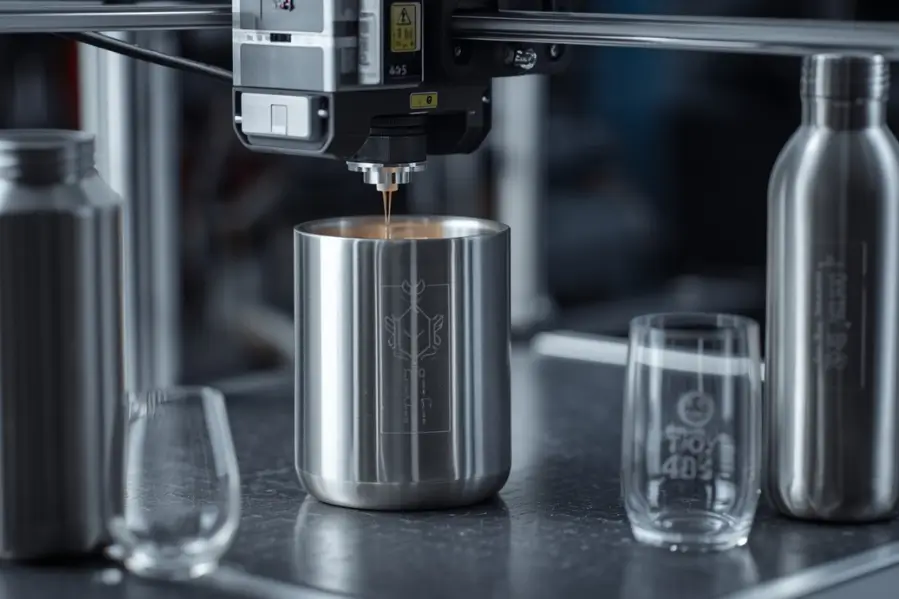

Laser engraving flat materials is relatively straightforward because the laser remains at a consistent distance from the surface. Curved and irregular objects, however, introduce additional challenges. Variations in height, angle, and focus can affect engraving quality, resulting in distorted designs, uneven depth, or blurry markings.
Fortunately, modern laser engraving systems and software make it possible to engrave on a wide range of non-flat objects, including tumblers, bottles, mugs, pipes, tools, jewelry, helmets, and custom-shaped products.
In this guide, you’ll learn how laser engraving on curved or irregular surfaces works, what equipment you need, common challenges, and proven techniques for achieving professional results.
Key Takeaways
- Curved and irregular surfaces require proper focus and positioning to achieve clean, accurate engravings.
- Rotary attachments are the most effective solution for engraving cylindrical objects such as tumblers, bottles, and mugs.
- Accurate measurements and proper artwork setup help prevent distortion on curved surfaces.
- Running a test engraving before production can improve alignment, readability, and overall engraving quality.
- Maintaining consistent focus is critical when engraving objects with varying heights and contours.
- Materials such as anodized aluminum, stainless steel, glass, wood, and acrylic work well for curved surface engraving.
- AI-powered software and modern laser systems are making curved and irregular surface engraving easier and more precise than ever.
What Types of Curved and Irregular Objects Can Be Laser Engraved?
Laser engraving is commonly used on many non-flat items.
Popular Curved Objects
- Stainless steel tumblers
- Water bottles
- Wine glasses
- Mugs
- Cylindrical containers
- Flashlights
- Pens
- Pipes and tubes
Common Irregular Objects
- Tools
- Jewelry
- Knives
- Firearm accessories
- Awards and trophies
- Sporting equipment
- Custom promotional products
The ability to engrave these products opens up opportunities for personalization, branding, and industrial marking.
Why Does Focus Matter When Engraving Curved Surfaces?
Laser engraving relies heavily on maintaining proper focus.
On a flat object, the distance between the laser lens and material remains constant. On a curved object, that distance changes continuously.
When the surface moves outside the laser’s focal range, you may experience:
- Blurry engraving
- Reduced contrast
- Uneven depth
- Distorted details
- Poor readability
The greater the curve, the more challenging it becomes to maintain engraving quality.
What Equipment Is Needed to Engrave Curved Surfaces?
The specific setup depends on the object being engraved.
Essential Equipment
- Laser engraving machine
- Rotary attachment
- Design software
- Proper workholding fixtures
- Autofocus system (if available)
Optional Equipment
- 3D scanning systems
- Dynamic focus systems
- Specialized jigs
- Adjustable supports
For cylindrical objects such as tumblers and bottles, a rotary attachment is often the most important accessory.
What Is a Rotary Attachment and How Does It Work?
A rotary attachment is a device designed to rotate cylindrical objects during engraving.
Instead of moving the laser around the object, the rotary rotates the object while the laser engraves across its surface.
Benefits of Rotary Attachments
- Maintains consistent engraving position
- Reduces distortion
- Enables full-wrap engraving
- Improves engraving accuracy
- Supports cylindrical products of various sizes
Rotary systems are widely used for engraving:
- Tumblers
- Water bottles
- Wine glasses
- Mugs
- Metal cylinders
For most curved engraving projects, a rotary attachment provides the best solution.
How Do You Prepare Artwork for Curved Surface Engraving?
Artwork preparation is critical for successful engraving.
Step 1: Measure the Object
Record:
- Diameter
- Circumference
- Engraving area
- Maximum engraving width
Accurate measurements help prevent design distortion.
Step 2: Create the Design
Use vector-based design software to create:
- Text
- Logos
- Graphics
- Patterns
Keep designs simple when engraving heavily curved surfaces.
Step 3: Adjust for Curvature
Large graphics may require scaling or distortion compensation to appear correct once engraved.
Many modern laser software platforms automatically calculate these adjustments.
What Is the Step-by-Step Process for Engraving a Curved Surface?
Step 1: Secure the Object
Mount the item firmly using:
- Rotary attachment
- Jig
- Fixture
- Support rollers
Any movement during engraving can ruin the design.
Step 2: Align the Engraving Area
Proper alignment ensures:
- Centered artwork
- Accurate positioning
- Consistent engraving
Most laser software provides alignment tools to simplify this process.
Step 3: Set the Correct Focus
Focus the laser at the engraving area.
Proper focus is especially important for maintaining detail on curved surfaces.
Step 4: Configure Machine Settings
Adjust:
- Power
- Speed
- DPI
- Frequency
- Dot duration
The ideal settings vary depending on the material and curvature.
Step 5: Run a Test
Experienced engravers almost always perform a test run before engraving the final piece.
Testing helps verify:
- Placement
- Readability
- Contrast
- Design proportions
Step 6: Start the Engraving Process
Once everything is confirmed, begin engraving.
Monitor the first few passes to ensure the object rotates correctly and remains stable.
What Challenges Can Occur When Engraving Irregular Shapes?
Irregular objects introduce additional complexity because they lack consistent geometry.
Common Problems
Uneven Focus
Different sections of the object may sit at different heights.
Distorted Artwork
Designs may stretch or compress across uneven surfaces.
Positioning Errors
Objects can shift during engraving if not secured properly.
Inconsistent Depth
The laser may remove more material in some areas than others.
Understanding these challenges helps reduce mistakes and improve consistency.
How Can You Improve Engraving Quality on Curved Objects?
Several best practices can significantly improve results.
Tips for Better Engraving
- Use a rotary attachment whenever possible
- Keep designs within the focal range
- Use high-quality vector artwork
- Secure objects firmly
- Run test engravings
- Maintain proper focus
- Optimize DPI settings
- Use material-specific settings
Small adjustments often make a noticeable difference in engraving quality.
Which Materials Work Best for Curved Surface Engraving?
Many materials can be engraved successfully.
Popular Materials
| Material | Engraving Quality |
|---|---|
| Anodized Aluminum | Excellent |
| Stainless Steel | Excellent |
| Powder-Coated Metal | Excellent |
| Glass | Very Good |
| Acrylic | Very Good |
| Wood | Excellent |
| Leather | Very Good |
Anodized aluminum tumblers and powder-coated drinkware remain among the most popular curved engraving applications.
Ready to Take on More Advanced Engraving Projects?
Curved and irregular surfaces may seem challenging, but with the right equipment and setup, they can be engraved with exceptional precision. From custom tumblers and bottles to industrial components and promotional products, laser engraving opens the door to countless creative and commercial opportunities.
At Thunder Laser USA, we provide advanced laser engraving systems, rotary attachments, and expert resources to help makers and businesses achieve professional results on flat, curved, and complex surfaces.
Conclusion
Engraving curved or irregular surfaces requires more planning than engraving flat materials, but the results can be impressive. By using proper workholding, maintaining focus, preparing artwork correctly, and leveraging tools such as rotary attachments, you can create clean, accurate, and professional engravings on a wide range of products.
Whether you’re personalizing drinkware, branding products, or marking industrial components, understanding these techniques will help you achieve consistent results and expand your engraving capabilities.
Related Read
- What Is DPI in Laser Engraving?
- What Is Dot Duration in Laser Engraving?
- Best Fonts and Text Styles for Laser Engraving
- How to Engrave a Name on Metal: Complete Process Explained
Frequently Asked Questions
Can a laser engraver engrave curved surfaces?
Yes. Many laser engravers can engrave curved surfaces using rotary attachments, specialized fixtures, or advanced focusing systems.
What is a rotary attachment?
A rotary attachment rotates cylindrical objects during engraving, allowing the laser to engrave evenly around the surface.
Can you engrave a tumbler with a laser?
Yes. Tumblers are one of the most common products engraved using a rotary attachment.
What is the biggest challenge when engraving curved surfaces?
Maintaining proper focus across the engraving area is typically the biggest challenge.
Can irregularly shaped objects be laser engraved?
Yes. Many irregular objects can be engraved using custom fixtures, careful positioning, and proper software adjustments.
Which materials are easiest to engrave on curved surfaces?
Anodized aluminum, stainless steel, powder-coated metals, wood, and acrylic generally produce excellent results.
Do I need special software for curved surface engraving?
Many modern laser software platforms include rotary and cylindrical engraving features that simplify the process.