
How to Fix Air Pressure Sensor Signal Interference (Garbled Touch Panel Pop-Ups)
Applies toBolt, Nova Plus, TitanTopicGeneral
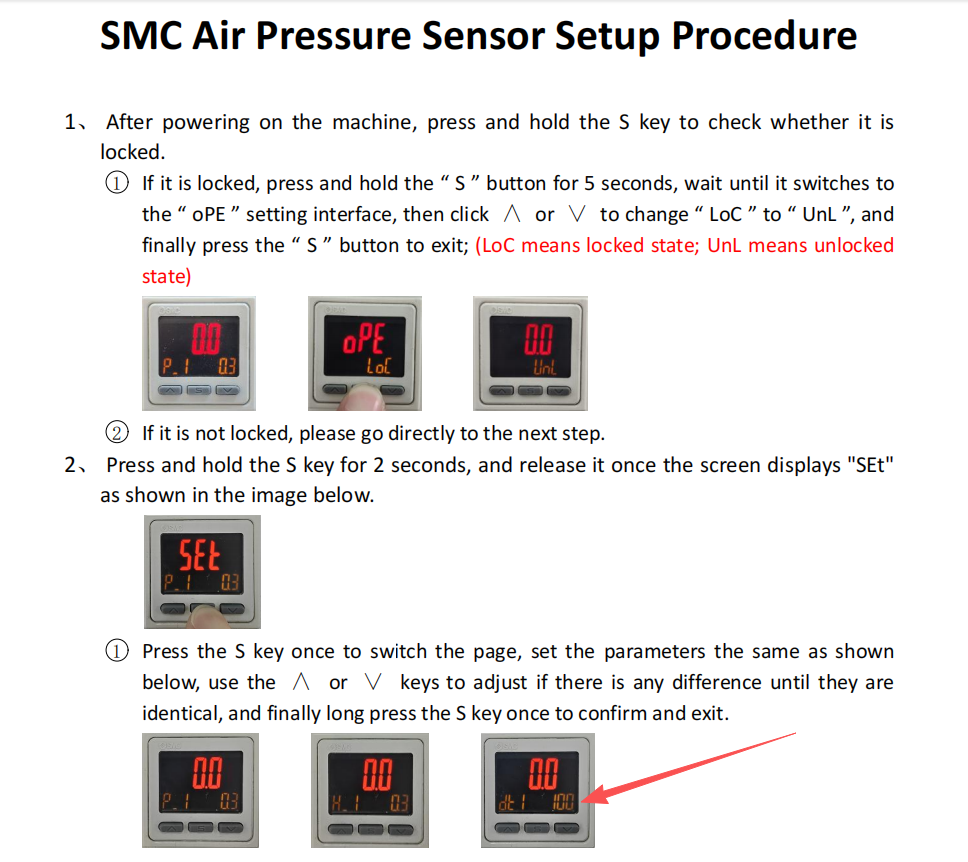
Quick answer: Set the barometric pressure sensor's DET detection delay value to 100 ms using the two steps shown in the screenshot and video below.
Applies to: All Thunder Laser machines with a rotary and air pressure sensor. You'll need: Access to the controller settings via the Touch Panel.
The Problem
The air pressure sensor signal interferes with the controller, causing the Touch Panel to display garbled pop-ups during operation. Changing the DET detection delay value eliminates this interference.
⚠ The two-step method shown below is the R&D feedback method for setting the barometric pressure sensor's DET detection delay value. R&D advises modifying the value to 100 ms according to the instructions in this document.
Video Walkthrough
Step-by-Step Instructions
Follow the two steps shown in the screenshot below to set the DET detection delay value to 100 ms.
Still stuck? If garbled pop-ups continue after setting the delay to 100 ms, contact Thunder Laser USA support for further assistance.
Still stuck?
Fastest response times in the industry from our US-based support team.