
Selecting Intelligent or Constant Mode on CW-5000 Series Chillers
Our chillers come programmed to intelligent mode for the T-503 temp controller (CW-5000 series) and constant mode for t-504 (CW-6000 series) controllers.
Intelligent mode means the water temperature will be maintained within a few degrees of the ambient air temperature as defined in the chiller controller settings.
Constant mode means the temp will be maintained within a few degrees of the set point (usually 20c).
Intelligent mode is fine in most cases, especially if the chiller is in a conditioned space.
Constant mode may be warranted if the chiller is in a non-conditioned environment.
How to Change to Constant Temp Mode from Intelligent Mode
- Press and hold "▲" button and "SET" button for 5 seconds
- Until "00" is displayed
- Press "▲" button to select the password "08". (Default setting is 08)
- Press "SET" button to enter menu setting
- Press "▲" button until F3 is displayed (F3 stands for way of control)
- Press "▼" button to change the data from 1 to 0. (1 means intelligent temperature control mode while 0 means constant temperature mode)
- Press "RST" button to save the modification and exit setting
You can find the users manual here: S&W CW-5000 Series Chiller User Manual
Here is how to change the temperature set point: Constant Mode Temperature Set Point on CW-5XXX Chillers
Video: How to Select the Mode
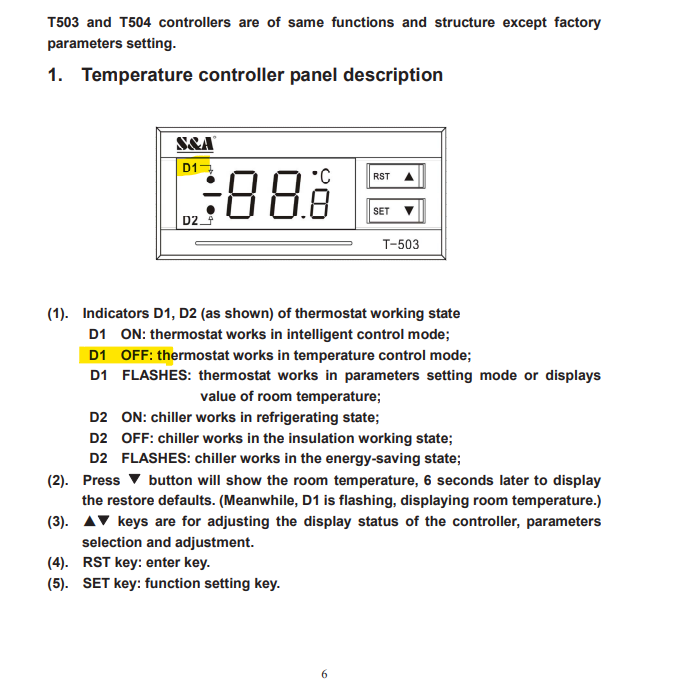
Indicator D1 will be OFF if the chiller is in constant mode. Indicator D1 will be ON if the chiller is in intelligent mode.
Still stuck?
Fastest response times in the industry from our US-based support team.