
Adjusting the RotoBoss Motor Tower for Misalignment
Applies toAll machinesTopicRotary
Verify Options
-
With the motor plate all the way down, turn the Rotary over on its side and check the gap between the motor plate and the Foot on the motor side.
- The Plate and foot should be parallel.

Raise the slave wheels up to the same height as the motor wheels and then slide/move the slave wheels up to the drive wheels so the faces touch each other.

- Faces should touch evenly on all sides (Top/Bottom and Side to Side).
- Check to see which wheel touches first.
- You will end up turning away from the wheels that touch first.
Corrective Action

- Move the slave wheels back out of the way.
- Raise the motor plate up until it clears the foot bar.

- If the wheels closest to you touch first, you will need to rotate the motor plate to the left; and vice versa for the inside wheels.
- Grab the cross bar (slider bar — horizontal — for slave wheels) with your right hand.

- Then grab the motor plate part closest to you with your left hand and, while holding the cross bar still, pull the motor plate towards the Left a little at a time until it is back in line even with the foot bar. Verify by step 1 above (in Verify Options).
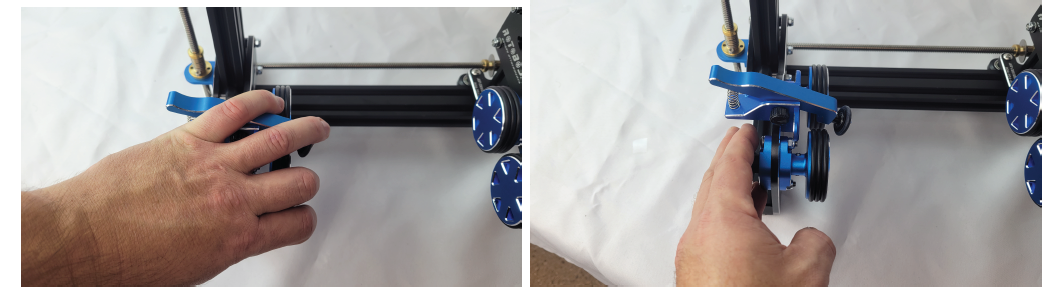
Repeat this step until it is back in line and the motor and slave wheel faces touch evenly and flat with each other.
- Grab the cross bar (slider bar — horizontal — for slave wheels) with your right hand.
- Once this is all done, return the motor plate to the full down position and you should be back up and running.
Still stuck?
Fastest response times in the industry from our US-based support team.