
Disabling The Safety Interlocks (Door Sensor Checking Board)
Preface: This article covers how to bypass the safety interlocks, the location of the door control board and safety warnings that should be followed if the user bypasses the interlocks.
Warning: It is 100% your responsibility to operate the machine in a safe manner. Thunder Laser USA assumes no responsibility for any damage, harm, injury etc. that may result from the bypassing of the machine safety. You should wear the proper PPE like safety glasses, inform anyone in the immediate area and take all the proper precautions to protect yourself and others from injury. The exhaust will not be as effective either, take precautions to extract the fumes that are output from the laser. Bypassing the interlocks will make the machine a Class IV type, with direct exposure to a Class IV source possible.
Video
The video below shows the location for the Door Flap board on a Nova but you can locate the same board on a Nova Plus, Bolt, Odin or Titan to perform the same task. On machine with V9.x TL timer, the Door Flap board will be installed on top of the TL timer board.
Written Procedure
Warning: USE OF PROPER SAFETY EYEWEAR AND PPE IS PRESCRIBED WHEN DEFEATING THE SAFETY SYSTEMS TO PULSE, TEST, ETC...
PLEASE SEE HERE: SAFETY INFO: C02 Laser Radiation, PPE, & Fire Suppression
-
Locate the Door Flap Board
Machine Series General Location Nova and Nova Plus Right Hand side, standalone Nova and Nova Plus 24 Left Hand side, standalone Odin Left Hand Side, standalone Bolt Left Hand side, installed on TL Timer Titan and Titan Pro Right Hand side, installed on TL Timer Standalone Example Installed on TL timer Example 

-
Press Button 6 on the Door board to Enable Bypass. The Red LED will light up or remain on even with door(s) open to let you know the doors are bypassed.
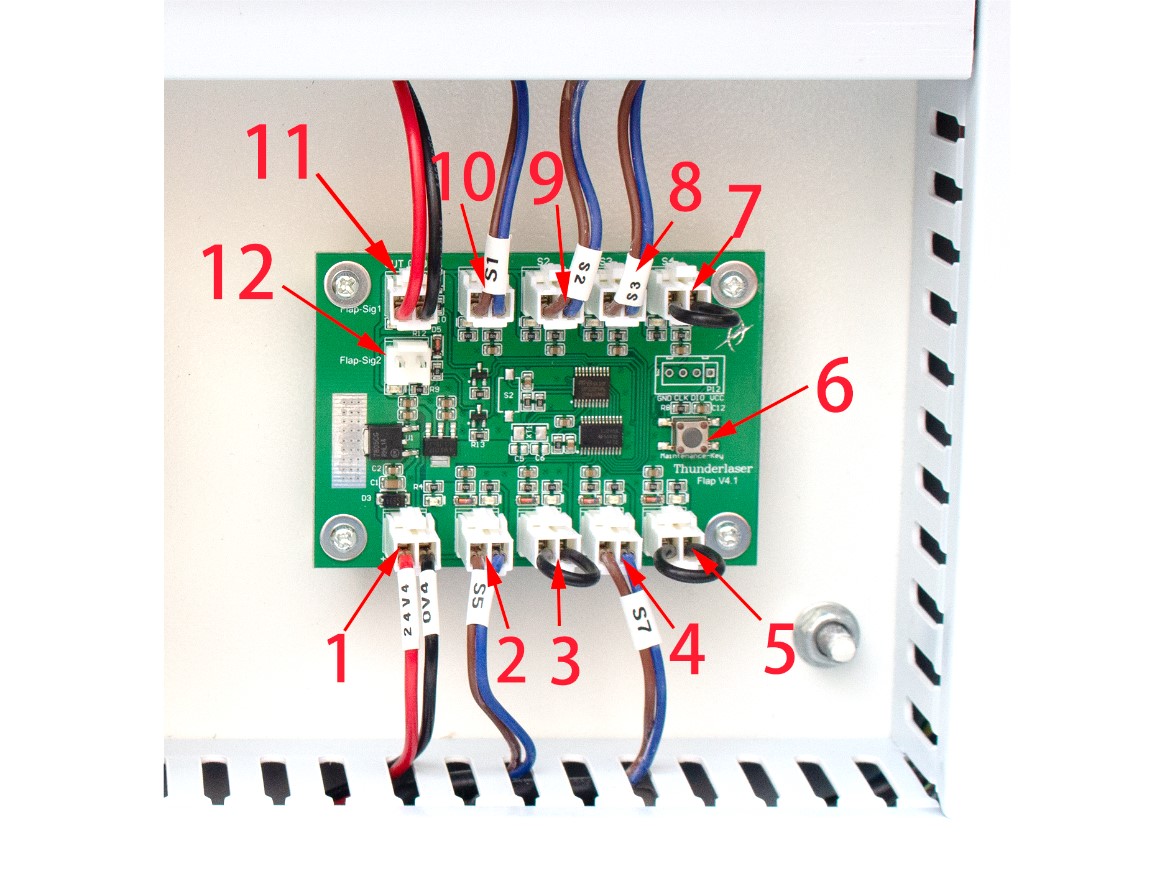
-
Press Button 6 again to Disable the Bypass (Power cycling the machine will disable the bypass)
Reference Articles
- Nova Series Machine Protected Work Paused Alarm Message
- Door Safety System information for sensors and flap board
- SAFETY INFO: C02 Laser Radiation, PPE, & Fire Suppression
Still stuck?
Fastest response times in the industry from our US-based support team.