
Nova X and Y Verticality Adjustment
Applies toNovaTopicMaintenance
Start off by scoring at 100mm square on a flat piece of material, then proceed with the adjustments of the bearings and couplers as needed. You may need to score the square again after making an adjustment to recheck and adjust. The diagonal lines on a 100mm square should be ~141.42mm. If you draw a 150mm square, the ruler from your toolbox will not be long enough to measure the diagnonals.

The larger the square you are able to draw and measure, the more accurate you can adjust your gantry motion. If you are using the ruler that was included in your toolbox, a 100mm square with 141.42mm diagonals is suggested
X Axis Bearing Method
Turn off the whole machine power. There are four screws for each side, loosen them then you can fine tuning the angle of the X Axis. Shown as below.
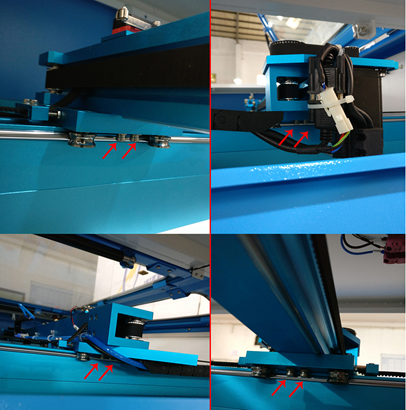
Diagonal line 1 = Diagonal line 2.
Error value must be less than 0.5mm like below:

①If the Diagonal line 1 > Diagonal line 2.
Please adjust as follow:

②If the Diagonal line 1 < Diagonal line 2.
Please adjust as follow:

Above are just fine tuning the angle of the X Axis, if the error still more than 0.5mm, please further to the solution 2.
Y Axis Coupler method:
Jog the gantry close to front of the machine.
Measure by ruler, make sure they are the same distance like shown. If they are off by more than .5mm, then you will need to adjust
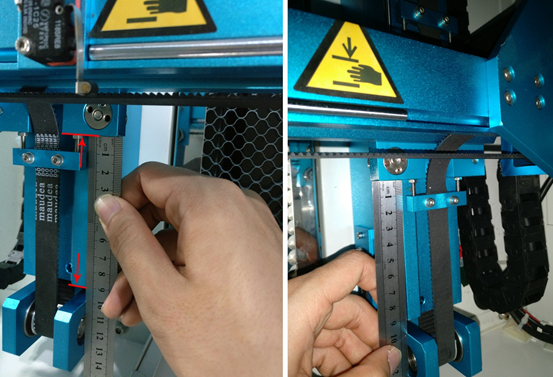
Loosen the Y Axis coupler ensure on the right side through the upper blue door. Adjust so that the Right side matches the Left
Note that you can loosen the coupler that is easiest to reach, on larger machines the coupler at the motor is hard to reach.

Then tighten the screws for the coupler (please do it carefully by tighten slowly to ensure the angle of Y Axis doesn’t change). After tightening the coupler, press the Red Reset button on the controller to reset the machine and then jog the gantry to the front again once ready. Measure the distance again of Left Vs Right, if greater than .5mm difference, adjust again. Repeat the process until less than .5mm difference.
Reference Video:
This video shows how to use the Coupler method with measuring and by using stop blocks.
Still stuck?
Fastest response times in the industry from our US-based support team.