
Unlock an Encrypted Ruida Controller
If you get an error message on your controller: Machine Encrypted Contact…..
You will need to install RDworks on a Windows PC. Get that from here: RDworks.
Steps to Unlock
-
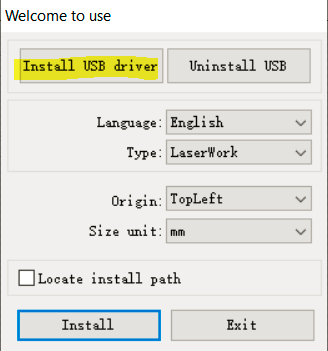
While installing RDworks, plug your machine in and select the "Install USB Driver"
-
Then finish the install:

-
Then locate the icon on your computer to run RDworks:

-
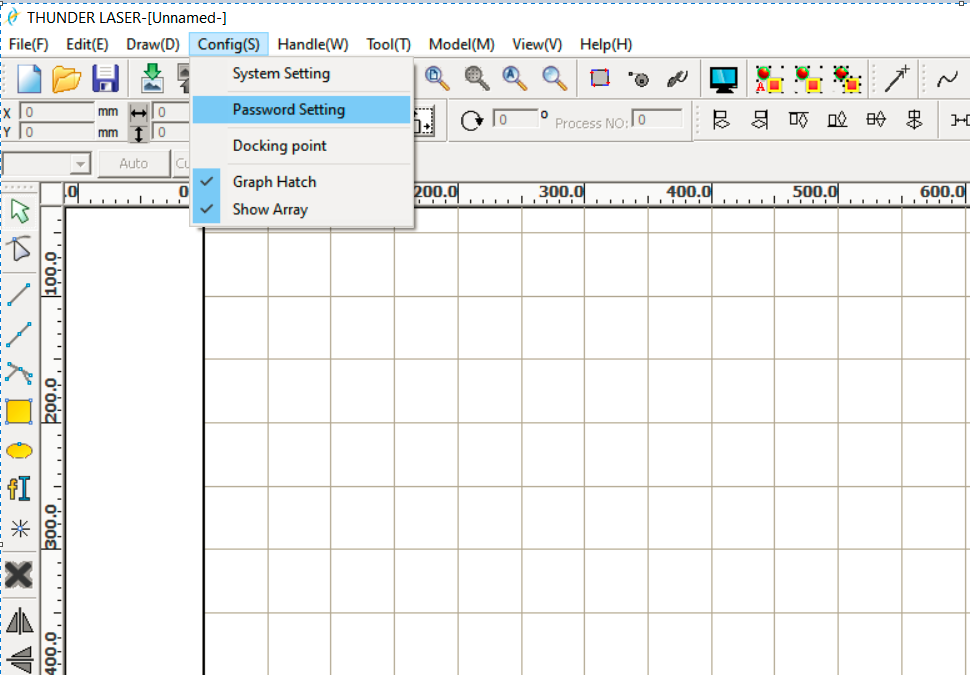
In RDworks, go to Config > Password selection.
-
Let RDworks communicate with the controller. Then enter the password "RD8888"

-
Then this prompt will show up:

-
Select 'Unlock mainboard'

Additional Information Direct from Cloudray (rough translation)
In the setting of the operating software menu, enter the factory password RD8888 in "Password Setting":
A. Enter to change the "manufacturer authority", first enter the old password RD8888, and then enter the new password (6 digits) to change the manufacturer's authority. (The factory password can directly "unlock the motherboard").
B. Enter "Encryption Number", there are encryption period and encryption days. Set the number of periods and days you want, and then click Save Password. (The system will automatically save the document. There are periods in the document, "time limit cancel system restriction entrance password", "number of days", "final cancellation of system restriction entry Password").
C. If it is a variable period, tick the "variable period" in the set period password, and then click Set, enter to change the number of periods and days, and then click Exit, and then click Save Password, the system will automatically save the document.
D. The system will automatically encrypt after the number of days of encryption. At this time, the control board will not be able to cut, and the operation panel will remind the board that it is encrypted.
E. Decryption, in the menu settings, "password settings", click "cancel system restriction entry password", and then enter the password in the document. Or directly enter the manufacturer's password to unlock the motherboard.
Still stuck?
Fastest response times in the industry from our US-based support team.