
Y Axis Motion Noise
Applies toAll machinesTopicTroubleshooting
When you move laser head front and back, two couplings make a lot of noise.
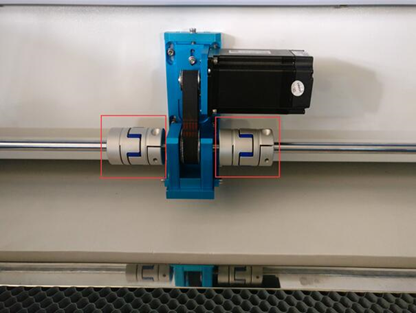
Both sides of transmission shaft are not aligned.
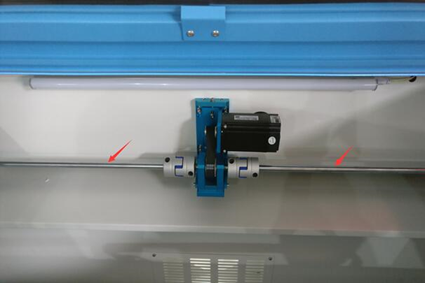
How to fix it?
- Turn off the whole machine power.
-
Take out the belt by taking down the motor.

Loosen three screws A firstly.
Adjust screw B anticlockwise to loosen the belt by taking down the motor.
Then take out the belt from the motor.
-
Loosen the four screws in the bottom of this unit as below:

Push the X Axis front and back by hand, will find that the noise is disappear.
This is the most important step to screw them back, cause fix the screws not good, it will make noisy again.
- ① Fasten the outward two screws first, please do it carefully, screw them a little then check the sounds by pushing the X Axis, screw them little by little until tighten them enough. Loosen them and repeat step ① again if the couplings make the large noise again.
- ② After it's ok of the sounds by fastening the outward two screws. Then fix the rest of screws in the bottom.
- ③ Adjust back the belt.
How to adjust the belt of Motor:
- Loosen three screws A firstly.
- Adjust screw B clockwise to tighten the belt; Adjust screw B anticlockwise to loosen the belt.
- The belt tension should be same with the belt X motor.
- After that, fasten the three screws A.
PS: A small noise is ok no affect the process results, it's hard to make the noise disappear fully by non-professionals.
Still stuck?
Fastest response times in the industry from our US-based support team.